

搜索到
196
篇与
的结果
-
 centos7.9安装ds蒸馏模型记录 安装 Ollamacurl -fsSL https://ollama.com/install.sh | sh报错[root@ah-ipv6 ~]# curl -fsSL https://ollama.com/install.sh | sh >>> Installing ollama to /usr/local ERROR: This version requires zstd for extraction. Please install zstd and try again: - Debian/Ubuntu: sudo apt-get install zstd - RHEL/CentOS/Fedora: sudo dnf install zstd - Arch: sudo pacman -S zstd [root@ah-ipv6 ~]#安装报错是因为 Ollama 的安装脚本需要 zstd 这个压缩工具来解压文件。这个错误信息已经直接给出了解决方案:先安装 zstd 再重试即可。安装 zstdsudo dnf install -y zstd还是报错[root@ah-ipv6 ~]# sudo dnf install -y zstd sudo: dnf:找不到命令 [root@ah-ipv6 ~]#报错 sudo: dnf:找不到命令 说明系统中没有 dnf 这个包管理器。这是因为 CentOS 7 及更早的 RHEL 系统默认使用 yum 作为包管理器,并未预装 dnf。此系统应该也属于这种情况。CentOS 7 的 yum 官方源已停用,以及某些第三方源(如 EPEL)因压缩格式不兼容也会报错。使用正确的包管理器安装 zstd[root@ah-ipv6 ~]# # 清理yum缓存并生成新缓存 [root@ah-ipv6 ~]# sudo yum clean all 已加载插件:fastestmirror, product-id, search-disabled-repos, subscription-manager This system is not registered with an entitlement server. You can use subscription-manager to register. 正在清理软件源: base cloudflared-stable docker-ce-stable epel extras updates Cleaning up list of fastest mirrors [root@ah-ipv6 ~]# sudo yum makecache 已加载插件:fastestmirror, product-id, search-disabled-repos, subscription-manager This system is not registered with an entitlement server. You can use subscription-manager to register. Determining fastest mirrors epel/x86_64/metalink | 4.2 kB 00:00:00 * base: mirrors.aliyun.com * epel: d2lzkl7pfhq30w.cloudfront.net * extras: mirrors.aliyun.com * updates: mirrors.aliyun.com base | 3.6 kB 00:00:00 cloudflared-stable | 1.5 kB 00:00:00 docker-ce-stable | 3.5 kB 00:00:00 epel | 4.3 kB 00:00:00 extras | 2.9 kB 00:00:00 updates | 2.9 kB 00:00:00 (1/22): base/7/x86_64/group_gz | 153 kB 00:00:00 (2/22): base/7/x86_64/primary_db | 6.1 MB 00:00:03 (3/22): base/7/x86_64/filelists_db | 7.2 MB 00:00:03 (4/22): docker-ce-stable/x86_64/updateinfo | 55 B 00:00:00 (5/22): docker-ce-stable/x86_64/filelists_db | 66 kB 00:00:00 (6/22): docker-ce-stable/x86_64/primary_db | 152 kB 00:00:00 (7/22): docker-ce-stable/x86_64/other_db | 145 kB 00:00:00 (8/22): base/7/x86_64/other_db | 2.6 MB 00:00:01 (9/22): epel/x86_64/group | 399 kB 00:00:00 (10/22): cloudflared-stable/filelists | 377 B 00:00:02 (11/22): cloudflared-stable/other | 423 B 00:00:02 (12/22): epel/x86_64/filelists_db | 15 MB 00:00:01 (13/22): epel/x86_64/updateinfo | 1.0 MB 00:00:00 (14/22): epel/x86_64/prestodelta | 592 B 00:00:00 (15/22): epel/x86_64/primary_db | 8.7 MB 00:00:00 (16/22): extras/7/x86_64/filelists_db | 305 kB 00:00:00 (17/22): extras/7/x86_64/other_db | 154 kB 00:00:00 (18/22): extras/7/x86_64/primary_db | 253 kB 00:00:00 (19/22): epel/x86_64/other_db | 4.1 MB 00:00:00 (20/22): updates/7/x86_64/filelists_db | 15 MB 00:00:08 (21/22): updates/7/x86_64/other_db | 1.6 MB 00:00:00 (22/22): updates/7/x86_64/primary_db | 27 MB 00:00:15 One of the configured repositories failed (未知), and yum doesn't have enough cached data to continue. At this point the only safe thing yum can do is fail. There are a few ways to work "fix" this: 1. Contact the upstream for the repository and get them to fix the problem. 2. Reconfigure the baseurl/etc. for the repository, to point to a working upstream. This is most often useful if you are using a newer distribution release than is supported by the repository (and the packages for the previous distribution release still work). 3. Run the command with the repository temporarily disabled yum --disablerepo=<repoid> ... 4. Disable the repository permanently, so yum won't use it by default. Yum will then just ignore the repository until you permanently enable it again or use --enablerepo for temporary usage: yum-config-manager --disable <repoid> or subscription-manager repos --disable=<repoid> 5. Configure the failing repository to be skipped, if it is unavailable. Note that yum will try to contact the repo. when it runs most commands, so will have to try and fail each time (and thus. yum will be be much slower). If it is a very temporary problem though, this is often a nice compromise: yum-config-manager --save --setopt=<repoid>.skip_if_unavailable=true Parsing primary.xml error: Start tag expected, '<' not found [root@ah-ipv6 ~]#看起来问题出在 cloudflared-stable 或 docker-ce-stable 这两个第三方仓库的元数据损坏了,导致 yum makecache 整体失败。我们可以暂时禁用它们,只从 CentOS 官方源和 EPEL 源安装 zstd。# 1. 禁用有问题的仓库,然后安装 zstd sudo yum --disablerepo=cloudflared-stable --disablerepo=docker-ce-stable install -y zstd运行结果[root@ah-ipv6 ~]# sudo yum --disablerepo=cloudflared-stable --disablerepo=docker-ce-stable install -y zstd 已加载插件:fastestmirror, product-id, search-disabled-repos, subscription-manager This system is not registered with an entitlement server. You can use subscription-manager to register. Loading mirror speeds from cached hostfile epel/x86_64/metalink | 4.2 kB 00:00:00 * base: mirrors.aliyun.com * epel: d2lzkl7pfhq30w.cloudfront.net * extras: mirrors.aliyun.com * updates: mirrors.aliyun.com base | 3.6 kB 00:00:00 extras | 2.9 kB 00:00:00 updates | 2.9 kB 00:00:00 正在解决依赖关系 --> 正在检查事务 ---> 软件包 zstd.x86_64.0.1.5.5-1.el7 将被 安装 --> 解决依赖关系完成 依赖关系解决 ================================================================================================================================================================================================= Package 架构 版本 源 大小 ================================================================================================================================================================================================= 正在安装: zstd x86_64 1.5.5-1.el7 epel 449 k 事务概要 ================================================================================================================================================================================================= 安装 1 件包 总下载量:449 k 安装大小:1.7 M Downloading packages: zstd-1.5.5-1.el7.x86_64.rpm | 449 kB 00:00:00 Running transaction check Running transaction test Transaction test succeeded Running transaction 正在安装 : zstd-1.5.5-1.el7.x86_64 1/1 验证中 : zstd-1.5.5-1.el7.x86_64 1/1 已安装: zstd.x86_64 0:1.5.5-1.el7 完毕! [root@ah-ipv6 ~]#zstd 已经成功安装。现在继续安装 Ollama:curl -fsSL https://ollama.com/install.sh | sh安装完成后,验证一下:ollama --version正常输出版本号(例如 ollama version is 0.5.1),就可以拉取并运行模型了。ollama run deepseek-r1:7bOllama 会自动下载模型并启动对话。出现 >>> Send a message (/? for help) 提示时,就说明成功了。
 -
PLM 批量查询工具问题分析与解决办法 初始问题现象上传 Excel(大量编号),页面显示 500 Internal Server Error。原因分析逐条查询导致超时原始代码对每个编号都执行 2 次独立的 SQL 查询,假设有 200 个编号,就需要 400 次数据库往返。PHP 默认 max_execution_time 为 30 秒,这种循环必然超时。超时后 PHP 进程被强制终止,Web 服务器返回 500 错误。无超时与内存配置未设置 set_time_limit 与 memory_limit,无法应对大数据量处理。错误信息不可见代码未将错误细节暴露给前端,只返回笼统的 500,难以排查。解决办法(根本方案)改循为批量查询:将所有编号一次传入 SQL,用单次查询替代多次查询。增加超时与内存设置:set_time_limit(600)、ini_set('memory_limit', '512M')。增强错误提示:每个可能失败点都将错误信息捕获到 $error 变量,在前端明确显示。{dotted startColor="#ff6c6c" endColor="#1989fa"/}再次出现问题:ORA-01460现象改用批量查询后,当编号总量大时,提示:批量查询执行失败:ORA-01460: 转换请求无法实施或不合理原因分析批量查询将多个编号拼接成 'id1,id2,id3,...' 的字符串,绑定到 :id_list 参数。Oracle 的 VARCHAR2 默认最大长度为 4000 字节(字符集 AL32UTF8 下,一个中文占 3 字节,但编号为字母数字,每个占 1 字节)。当编号数量很多时(比如 500 个编号,每个 12 字符,加上逗号可达 6500 字节),超出 4000 字节限制,Oracle 无法隐式转换,抛出 ORA-01460。解决办法:分批查询(Batch)将编号数组按 100 个一组切片(array_chunk)。循环执行批量查询,每次绑定 :id_list 只包含 100 个以内的编号,保证字符串长度远低于 4000 字节。合并各批次结果,生成最终的 CSV。计算验证:编号格式如 CB115F0B0002 只有 12 字符。100 个编号拼接长度 ≈ 12×100 + 99 = 1299 字节,安全。批量查询 SQL(单批次)$batchSql = " WITH input_ids AS ( SELECT TRIM(COLUMN_VALUE) AS body_id FROM XMLTABLE(('\"' || REPLACE(:id_list, ',', '\",\"') || '\"')) ), comp_masters AS ( SELECT i.body_id, bs.END2\$MASTER AS master_fk FROM input_ids i JOIN PLM2024.BOMVIEW_0 bv ON bv.MD_ID = i.body_id JOIN PLM2024.BOMSTRUCTURE_0 bs ON bs.VIEWFK = bv.GUID ), item_with_rn AS ( SELECT cm.body_id, it.MD_NAME, it.MD_ID, it.SPECIFICATION, it.REVISIONID, ROW_NUMBER() OVER (PARTITION BY cm.body_id, it.MD_ID ORDER BY it.REVISIONID DESC) AS rn FROM comp_masters cm JOIN PLM2024.ITEM_0 it ON it.MASTERFK = cm.master_fk ), latest_component AS ( SELECT body_id, MD_NAME, MD_ID, SPECIFICATION FROM item_with_rn WHERE rn = 1 ), original_item AS ( SELECT i.body_id, i0.SPECIFICATION AS spec, i1.F_000160 AS product_desc FROM input_ids i JOIN PLM2024.ITEM_0 i0 ON i0.MD_ID = i.body_id LEFT JOIN PLM2024.ITEM_1 i1 ON i1.FOUNDATIONFK = i0.GUID ) SELECT cs.body_id AS \"编号\", oi.product_desc AS \"品号描述\", oi.spec AS \"规格\", cs.MD_NAME, cs.MD_ID, cs.SPECIFICATION FROM latest_component cs LEFT JOIN original_item oi ON cs.body_id = oi.body_id ORDER BY cs.body_id, cs.MD_ID ";分批执行并合并结果foreach ($batches as $batch) { $idListStr = implode(',', $batch); $stmt = oci_parse($conn, $batchSql); if (!$stmt) { $e = oci_error($conn); $error = "SQL 解析失败:" . $e['message']; break; } oci_bind_by_name($stmt, ':id_list', $idListStr); if (!oci_execute($stmt)) { $e = oci_error($stmt); $error = "查询执行失败:" . $e['message']; oci_free_statement($stmt); break; } while ($row = oci_fetch_array($stmt, OCI_ASSOC + OCI_RETURN_NULLS)) { $outputData[] = $row; } oci_free_statement($stmt); }超时与错误可见性set_time_limit(600); ini_set('memory_limit', '512M'); ini_set('display_errors', 0); // 生产环境禁止直接输出 error_reporting(E_ALL); // 致命错误兜底 register_shutdown_function(function() use (&$error) { $last = error_get_last(); if ($last && in_array($last['type'], [E_ERROR, E_PARSE, E_CORE_ERROR, E_COMPILE_ERROR])) { if (empty($error)) { $error = "致命错误: " . $last['message']; } } });问题解决流程总结原始 500 错误 → 循环查询导致超时 → 改为单次批量查询。批量查询又报 ORA-01460 → 输入字符串超过 4000 字节 → 改为按 100 个一批分多次查询。增强健壮性 → 每个步骤检测错误并显式输出,配置超时与内存。最终效果:无论 Excel 包含多少个编号,都能在几秒内稳定完成查询,且错误原因一目了然。
-
搭建SSH隧道 建立单个临时隧道(手工,不保活)在内网服务器上执行:ssh -p 公网SSH端口 -R 公网端口:127.0.0.1:内网端口 root@公网IP注意加上 -fN 可后台运行:ssh -fN -p 50001 -R ...此隧道断开后不会自动重连,适合临时测试。{dotted startColor="#ff6c6c" endColor="#1989fa"/}{card-default label="建立保活的隧道(autossh + systemd)" width=""}安装 autossh(内网服务器)yum install -y epel-release && yum install -y autossh配置 SSH 免密登录(必须)ssh-keygen -t rsa -b 4096 -N "" -f ~/.ssh/id_rsa ssh-copy-id -p 50001 root@120.47.167.39测试:ssh -p 50001 root@120.47.167.39 echo "OK" 不输密码即成功。创建 systemd 服务文件cat > /etc/systemd/system/autossh-tunnel.service <<EOF [Unit] Description=AutoSSH tunnel After=network.target [Service] Environment="AUTOSSH_GATETIME=0" ExecStart=/usr/bin/autossh -M 0 -NT -p 50001 -o "ServerAliveInterval=30" -o "ServerAliveCountMax=3" -o "ExitOnForwardFailure=yes" -o "StrictHostKeyChecking=no" -R 29000:127.0.0.1:29000 -R 34816:127.0.0.1:34816 root@120.47.167.39 Restart=always RestartSec=10 User=root [Install] WantedBy=multi-user.target EOF启动并启用服务systemctl daemon-reload systemctl enable autossh-tunnel systemctl start autossh-tunnel systemctl status autossh-tunnel # 应显示 active (running){/card-default}{dotted startColor="#ff6c6c" endColor="#1989fa"/}后续如何添加新的隧道方法一:修改现有 systemd 服务停止服务:systemctl stop autossh-tunnel编辑服务文件:vi /etc/systemd/system/autossh-tunnel.service在 ExecStart 行中增加新的 -R 公网端口:127.0.0.1:内网端口ssh -fN -p 50001 -R 新公网端口:127.0.0.1:新内网端口 root@120.47.167.39重载配置并重启:systemctl daemon-reload systemctl restart autossh-tunnel方法二:临时添加(不保活,仅测试)ssh -fN -p 50001 -R 新公网端口:127.0.0.1:新内网端口 root@120.47.167.39检查隧道状态是否正常查看 autossh 服务状态(内网服务器)systemctl status autossh-tunnelactive (running) 表示进程在运行。若显示 failed,查看日志:journalctl -u autossh-tunnel -n 50查看公网服务器端口监听在公网服务器上执行:ss -tlnp | grep -E "29000|34816"应看到 0.0.0.0:29000 和 0.0.0.0:34816,进程为 sshd。从外网测试端口连通性(Windows PowerShell)Test-NetConnection -ComputerName 120.47.167.39 -Port 29000 Test-NetConnection -ComputerName 120.47.167.39 -Port 34816结果应为 TcpTestSucceeded : True。{dotted startColor="#ff6c6c" endColor="#1989fa"/}关机后如何重启场景一:内网服务器关机后重启autossh 服务已设置 enable,开机后自动启动。等待约 10-30 秒(网络就绪 + autossh 重连),隧道自动恢复。公网服务器无需任何操作。验证:systemctl status autossh-tunnel 和 ss -tlnp。场景二:公网服务器关机后重启需要确保公网服务器上的 sshd 服务开机自启(默认已启用)。内网服务器的 autossh 会检测到连接断开,并自动尝试重连(每 10 秒一次),一旦公网 SSH 恢复,隧道自动重建。无需人工干预。场景三:两个服务器都重启了顺序无所谓,autossh 会持续重连直到成功。建议等待 1 分钟后检查。手动重启隧道systemctl restart autossh-tunnel
-
技术文档 So it is today. Schedule disaster, functional misfits, and system bugs all arise because the left hand doesn't know what the right hand is doing. As work (), the several teams slowly change the functions, sizes, and speeds of their own programs, and they explicitly or implicitly ( ) their assumptions about the inputs available and the uses to be made of the outputs.For example, the implementer of a program-overlaying function may run into problems and reduce speed relying on statistics that show how ( ) this function will arise in application programs. Meanwhile, back at the ranch, his neighbor may be designing a major part of the supervisor so that it critically depends upon the speed of this function. This change in speed itself becomes a major specification change, and it needs to be proclaimed abroad and weighed from a system point of view.How, then, shall teams ( ) with one another? In as many ways as possible.Informally. Good telephone service and a clear definition of intergroup dependencies will encourage the hundreds of calls upon which common interpretation of written documents depends.Meetings. Regular project meetings, with one team after another giving technical riefings, are ( ). Hundreds of minor misunderstandings get smoked out this way.Workbook. A formal project workbook must be started at the beginning.{dotted startColor="#ff6c6c" endColor="#1989fa"/}The entity-relationship (E-R) data model is based on a perception of a real world that consists of a clletion of basic objects, called( ) ,and of relationships among these objects.An entity is a“thing”or "object" in the real world that is distinguishable from other objects.Entities are described in a database by asetof() : A relationship is an association among several entities. The set of all entities of the same type and the set of all relationships of the ametype are termed an entity sct and relationship set, respectively. The overall logical structure (schema) of a database can be expressed graphically by an E-R diagram, which is built up from the fllowing components:( ) represent entity set,( ) represent atributes, ete. In addition to entities and relations, the E-R model represents certain( )to which the contents of a database must conform. The entity-relationship model is widely used in database design.{dotted startColor="#ff6c6c" endColor="#1989fa"/}In the fields of physical security and information security, access control is the selective restriction of access to a place or other resource. The act of accessing may mean consuming,entering, or using. Permission to access a resource is called authorization(授权).An access control mechanism(请作答此空)between a user (or a process executing on behalf of a user) and system resources, such as applications, operating systems, firewalls; routers, files,and databases. The system must first authenticate(验证)a user seeking access. Typically the authentication function determines whether the user is ( ) to access the system at all.Then the access control function determines if the specific requested access by this user is permitted. A security administrator maintains an authorization database that specifies what type of access to which resources is allowed for this user. The access control function consults this database to determine whether to( ) access. An auditing function monitors and keeps a record of user accesses to system resources.In practice, a number of( )may cooperatively share the access control function. All Operating systems have at least a rudimentary(基本的).and in many cases a quite robust, access control component. Add-on security packages can add to the ( )access control capabilities of the OS. Particular applications .or utilities, such as a database management system, also incorporate access control functions. External devices, such as firewalls, can also provide access control services .
-
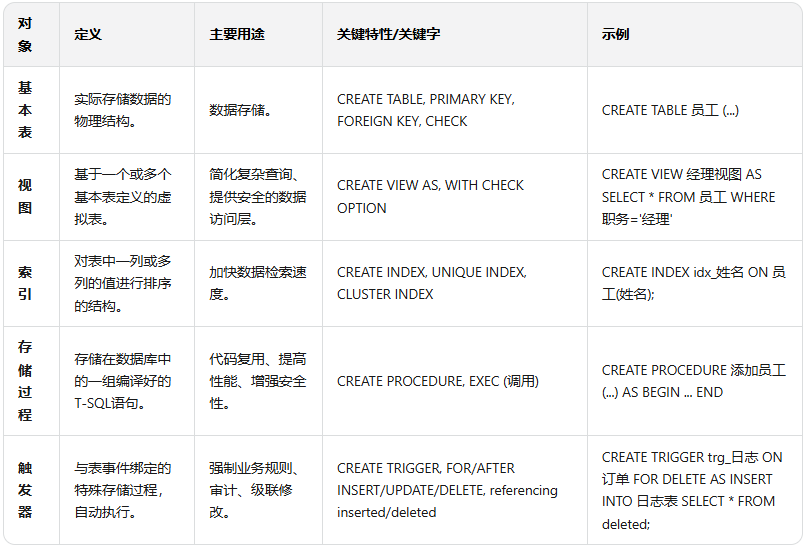
SQL语言应用:高级查询与数据库编程 旨在考查对SQL语言的掌握深度,从基础的增删改查,到复杂的多表连接、子查询、事务控制,乃至存储过程和触发器等数据库编程技术。{dotted startColor="#ff6c6c" endColor="#1989fa"/}复杂查询与优化核心考点与出题思想多表连接查询:这是SQL查询的绝对核心,要求能够根据业务需求,正确选择合适的连接类型并编写关联条件。内连接(INNER JOIN):返回两表中满足连接条件的记录。这是最常用的连接类型。外连接(OUTER JOIN):包括左外连接(LEFT JOIN)、右外连接(RIGHT JOIN)和全外连接(FULL JOIN)。它们分别保证左表、右表或两表的所有记录都被返回,即使在另一表中没有匹配的记录。考试中常出现需要查询“所有学生及其选课情况”(包括未选课的学生)的场景,这必须使用左外连接。子查询:子查询是嵌套在另一个查询语句中的SELECT语句,是解决复杂问题的利器。where子查询:将子查询的结果作为外层查询的过滤条件。例如,“查询与‘张三’在同一个部门的员工”。from子查询:将子查询的结果作为一个临时表,供外层查询使用。exists子查询:用于检查是否存在满足某种条件的记录,返回布尔值(TRUE或FALSE)。这是历年考试中极易出现的考点,尤其是“双重否定”形式的查询,如“查询没有选修任何课程的学生的学号”。这种查询通常使用NOT EXISTS关键字,其逻辑是检查子查询是否返回空集。集合操作:UNION(并)、INTERSECT(交)、EXCEPT(差)。窗口函数:这是近年来越来越重要的一个考点。ROW_NUMBER()、RANK()、DENSE_RANK()等函数可以用于分组排序,在解决“第N高工资”、“成绩排名”等问题时非常高效。解题策略与避坑指南明确查询目标与数据源:在动笔写SQL之前,务必搞清楚最终需要输出哪些列,以及这些列分别来自哪些表。这是构建正确查询的逻辑基础。选择合适的连接方式:如果需要返回两个表都匹配的记录,用INNER JOIN。如果需要返回左边表的所有记录,并根据条件匹配右边表,用LEFT JOIN。如果需要返回右边表的所有记录,并根据条件匹配左边表,用RIGHT JOIN。处理双重否定:遇到“没有”、“从未”、“全部”等关键词时,应首先考虑使用NOT IN或NOT EXISTS。理解两者的区别至关重要:NOT IN子查询的结果集不能包含NULL值,如果子查询可能返回NULL,则整个查询结果将为空,这是常见的逻辑陷阱。而NOT EXISTS不受NULL值的影响,通常更为安全和高效。验证逻辑:写完SQL后,建议用草稿纸模拟少量数据,走查SQL的逻辑流程,特别是对于复杂的嵌套子查询和连接,这一步能有效发现潜在的逻辑错误{dotted startColor="#ff6c6c" endColor="#1989fa"/}数据库对象与数据控制核心考点与出题思想这部分内容主要考查对数据库核心组件的创建、管理和控制能力,包括表、视图、索引和完整性约束。表的定义与完整性约束:主键约束(PRIMARY KEY):唯一且非空,用于实体完整性。外键约束(FOREIGN KEY):引用另一个表的主键,用于保证参照完整性。外键约束可以定义级联操作(ON DELETE CASCADE/SET NULL),这是一个重要考点。唯一约束(UNIQUE):保证列中所有值互不相同,但允许NULL值(取决于具体数据库系统)。检查约束(CHECK):用于强制域完整性,确保列中的值满足指定的条件(如性别只能为‘男’或‘女’,年龄必须大于0。视图(VIEW):视图是一个虚拟表,其内容由一个查询定义。WITH CHECK OPTION:这是一个关键选项。当通过视图插入或修改数据时,WITH CHECK OPTION会确保这些操作满足视图的WHERE子句条件,否则操作将被拒绝 。索引(INDEX):唯一索引(UNIQUE INDEX):确保索引列中没有重复值。聚簇索引(CLUSTER INDEX):这是一种特殊的索引,它会改变表中数据的物理存储顺序,使其与索引键的顺序一致。一个表只能有一个聚簇索引。解题策略与避坑指南完整性约束的综合应用:在创建表时,经常需要同时定义多种约束。需要注意PRIMARY KEY、FOREIGN KEY和UNIQUE约束在语法上的区别。一个常见错误是将UNIQUE和NOT NULL约束混用,实际上,在多数数据库中,UNIQUE约束本身就隐含了对非空值的唯一性保证,但对于主键,必须显式指定NOT NULL。理解WITH CHECK OPTION:这个选项的功能是考试中极易设置“陷阱”的地方。必须明确,它的作用是限制对视图的DML操作,使其只能作用于视图“可见”的那部分数据行。索引的权衡:索引能加速查询,但会降低写入速度并占用额外存储空间。考试中常要求为某个查询需求选择合适的索引类型。原则是:通常在WHERE子句中的列、JOIN条件中的列、以及ORDER BY或GROUP BY涉及的列上创建索引。{dotted startColor="#ff6c6c" endColor="#1989fa"/}存储过程与触发器核心考点与出题思想存储过程和触发器是实现复杂业务规则和自动化数据处理的重要工具,是SQL语言应用模块中的难点。存储过程(Stored Procedure):存储过程是一组为了完成特定功能的T-SQL语句集合,它被编译后存储在数据库中,可以通过名称和参数来调用。它能够提高代码的重用性、执行效率和安全性。触发器(Trigger):触发器是一种特殊的存储过程,它在指定的数据修改语句(INSERT、UPDATE、DELETE)执行之前(BEFORE)或之后(AFTER)被自动触发执行。临时表:在触发器内部,通常可以使用REFERENCING子句来引用两个逻辑上的临时表:inserted:包含了INSERT或UPDATE语句所影响的新行。deleted:包含了DELETE或UPDATE语句所影响的旧行。触发器常用于实现复杂的业务验证、审计日志记录、数据的自动计算与同步等功能。解题策略与避坑指南存储过程 vs. 触发器:这是概念辨析题的常考内容。核心区别在于它们的执行方式。存储过程是一个命名的代码块,需要显式调用;而触发器与表紧密关联,是自动、隐式被激发执行的,用户对它的调用无感知。触发器逻辑编写:在编写触发器时,首先要明确触发事件(Insert、Update 或 Delete)以及触发时机(BEFORE 或 AFTER)。熟练掌握inserted和deleted临时表的使用。例如,在一个INSERT触发器中,新插入的数据存储在inserted表中;在一个UPDATE触发器中,更新前的数据存储在deleted表中,更新后的数据存储在inserted表中。触发器的动作主体(即BEGIN和END之间的SQL代码)必须能够正确处理多行数据。由于一次INSERT、UPDATE或DELETE操作可能影响多行数据,因此inserted和deleted表中可能包含多行记录,触发器内的逻辑应避免使用假设只操作单行数据的变量。核心数据库对象对比




0:00