

搜索到
179
篇与
的结果
-
 PDF搜索优化 <body> <div class="container"> <h1>PDF搜索</h1> <div class="control-panel"> <input type="text" id="searchInput" placeholder="输入关键词搜索..."> </div> <div class="progress-container"> <div class="progress-bar" id="progressBar"></div> </div> <div class="status-area" id="status"> 准备就绪,请输入关键词搜索PDF文件 </div> <div id="results"> <div class="no-results">没有找到PDF文件</div> </div> <div id="pdfPreview"> <div class="preview-header"> <h3 id="previewTitle"></h3> <button id="closePreview">×</button> </div> <iframe id="pdfViewer"></iframe> </div> </div> <script> document.addEventListener('DOMContentLoaded', function() { const searchInput = document.getElementById('searchInput'); const resultsDiv = document.getElementById('results'); const statusDiv = document.getElementById('status'); const progressBar = document.getElementById('progressBar'); const pdfPreview = document.getElementById('pdfPreview'); const previewTitle = document.getElementById('previewTitle'); const pdfViewer = document.getElementById('pdfViewer'); const closePreview = document.getElementById('closePreview'); // 输入框事件 searchInput.addEventListener('input', filterFiles); // 关闭预览 closePreview.addEventListener('click', () => { pdfPreview.style.display = 'none'; }); // 从后端获取PDF文件列表 async function fetchFiles() { try { const response = await fetch('get-pdf-files.php'); // 后端API const data = await response.json(); if (data.success) { updateUI(data.files); } else { statusDiv.textContent = '获取文件失败,请重试'; } } catch (error) { statusDiv.textContent = '发生错误,请稍后再试'; console.error(error); } } // 过滤文件 function filterFiles() { const searchTerm = searchInput.value.trim().toLowerCase(); if (searchTerm === '') { statusDiv.textContent = '请输入关键词搜索'; return; } fetchFiles(); } function updateUI(files) { const filteredFiles = files.filter(file => file.name.toLowerCase().includes(searchInput.value.trim().toLowerCase())); if (filteredFiles.length === 0) { resultsDiv.innerHTML = '<div class="no-results">没有找到匹配的PDF文件</div>'; return; } const fileList = document.createElement('ul'); fileList.className = 'file-list'; filteredFiles.forEach(file => { const fileItem = document.createElement('li'); fileItem.className = 'file-item'; fileItem.innerHTML = ` <div class="file-info"> <div class="file-name">${file.name}</div> <div class="file-path">${file.path}</div> </div> <div class="file-size">${formatFileSize(file.size)}</div> `; fileItem.addEventListener('click', () => previewPDF(file)); fileList.appendChild(fileItem); }); resultsDiv.innerHTML = ''; resultsDiv.appendChild(fileList); } // 预览PDF文件 function previewPDF(file) { previewTitle.textContent = file.name; pdfViewer.src = file.url; // 预览链接 pdfPreview.style.display = 'block'; } // 格式化文件大小 function formatFileSize(bytes) { if (bytes === 0) return '0 Bytes'; const units = ['Bytes', 'KB', 'MB', 'GB']; const i = Math.floor(Math.log(bytes) / Math.log(1024)); return `${parseFloat((bytes / Math.pow(1024, i)).toFixed(2))} ${units[i]}`; } // 启动时获取文件 fetchFiles(); }); </script> </body><body> <div class="container"> <h1>PDF搜索</h1> <div class="control-panel"> <button id="selectFolderBtn" class="btn">选择文件夹</button> <input type="file" id="folderInput" webkitdirectory directory multiple hidden> <button id="importJsonBtn" class="btn">导入JSON</button> <button id="exportJsonBtn" class="btn">导出为JSON</button> <input type="file" id="jsonInput" accept=".json" hidden> <input type="text" id="searchInput" placeholder="输入至少3个字符搜索..." disabled> </div> <div class="status-area" id="status"> 准备就绪,请选择包含PDF的文件夹或导入JSON </div> <div id="results"> <div class="no-results">没有找到PDF文件</div> </div> <div id="pdfPreview"> <div class="preview-header"> <h3 id="previewTitle"></h3> <button id="closePreview">×</button> </div> <iframe id="pdfViewer"></iframe> </div> </div> <script> document.addEventListener('DOMContentLoaded', function() { const selectFolderBtn = document.getElementById('selectFolderBtn'); const folderInput = document.getElementById('folderInput'); const searchInput = document.getElementById('searchInput'); const resultsDiv = document.getElementById('results'); const statusDiv = document.getElementById('status'); const pdfPreview = document.getElementById('pdfPreview'); const previewTitle = document.getElementById('previewTitle'); const pdfViewer = document.getElementById('pdfViewer'); const closePreview = document.getElementById('closePreview'); let currentPDFFiles = []; let searchTimeout = null; // 新增JSON文件input const jsonInput = document.getElementById('jsonInput'); // 尝试加载同路径的pdf_data.json fetch('pdf_data.json') .then(response => response.json()) .then(data => { currentPDFFiles = data; statusDiv.textContent = `已从JSON加载 ${data.length} 个PDF记录`; searchInput.disabled = false; displayFiles(data); }) .catch(() => { statusDiv.textContent = '本地未找到pdf_data.json,请选择文件夹或导入JSON'; }); // 导出为JSON function exportToJSON() { if (currentPDFFiles.length === 0) { statusDiv.textContent = '没有数据可以导出'; return; } const exportData = currentPDFFiles.map(file => ({ name: file.name, path: file.path, object: file.object, })); const dataStr = JSON.stringify(exportData, null, 2); const blob = new Blob([dataStr], { type: 'application/json' }); const url = URL.createObjectURL(blob); const a = document.createElement('a'); a.href = url; a.download = 'pdf_export.json'; document.body.appendChild(a); a.click(); document.body.removeChild(a); URL.revokeObjectURL(url); } // 导入JSON处理 function handleJsonImport(event) { const file = event.target.files[0]; if (!file) return; const reader = new FileReader(); reader.onload = function(e) { try { const data = JSON.parse(e.target.result); currentPDFFiles = data; statusDiv.textContent = `已从JSON导入 ${data.length} 个PDF记录`; searchInput.disabled = false; displayFiles(data); } catch (error) { statusDiv.textContent = 'JSON文件格式错误'; } }; reader.readAsText(file); } // 修改预览函数处理缺少文件对象的情况 function previewPDF(file) { if (!file.fileObject) { statusDiv.textContent = '请重新选择文件夹以激活预览功能'; return; } previewTitle.textContent = file.name; pdfViewer.src = createObjectURL(file.fileObject); pdfPreview.style.display = 'block'; } // 显示文件列表(最多显示10条) function displayFiles(files) { if (files.length === 0) { resultsDiv.innerHTML = '<div class="no-results">没有找到匹配的PDF文件</div>'; return; } const displayCount = Math.min(files.length, 10); // 最多显示10条 statusDiv.textContent = `找到 ${files.length} 个PDF,显示前 ${displayCount} 个`; const fileList = document.createElement('ul'); fileList.className = 'file-list'; files.slice(0, 10).forEach(file => { const fileItem = document.createElement('li'); fileItem.className = 'file-item'; fileItem.innerHTML = ` <div class="file-info"> <div class="file-name">${file.name}</div> <div class="file-path">${file.path}</div> </div> `; fileItem.addEventListener('click', () => previewPDF(file)); fileList.appendChild(fileItem); }); resultsDiv.innerHTML = ''; resultsDiv.appendChild(fileList); } // 预览PDF文件 function previewPDF(file) { previewTitle.textContent = file.name; pdfViewer.src = URL.createObjectURL(file.fileObject); pdfPreview.style.display = 'block'; console.log('路径',pdfViewer.src); } // 重置状态 function resetState() { currentPDFFiles = []; searchInput.value = ''; searchInput.disabled = true; resultsDiv.innerHTML = '<div class="no-results">没有找到PDF文件</div>'; statusDiv.textContent = '准备就绪,请选择包含PDF的文件夹'; } // 处理文件夹选择 function handleFolderSelection(event) { const files = Array.from(event.target.files) .filter(file => file.name.toLowerCase().endsWith('.pdf')) .map(file => ({ name: file.name, path: file.webkitRelativePath || file.name, fileObject: file })); currentPDFFiles = files; if (files.length > 0) { statusDiv.textContent = `已加载 ${files.length} 个PDF文件`; searchInput.disabled = false; displayFiles(files); } else { statusDiv.textContent = '选择的文件夹中没有PDF文件'; searchInput.disabled = true; } } // 处理搜索输入(至少3个字符才搜索) function handleSearchInput() { clearTimeout(searchTimeout); const query = searchInput.value.trim().toLowerCase(); if (query.length < 3) { displayFiles(currentPDFFiles); return; } searchTimeout = setTimeout(() => { const filtered = currentPDFFiles.filter(file => file.name.toLowerCase().includes(query) || file.path.toLowerCase().includes(query) ); displayFiles(filtered); }, 300); } // 事件监听 document.getElementById('exportJsonBtn').addEventListener('click', exportToJSON); document.getElementById('importJsonBtn').addEventListener('click', () => jsonInput.click()); jsonInput.addEventListener('change', handleJsonImport); selectFolderBtn.addEventListener('click', () => folderInput.click()); folderInput.addEventListener('change', handleFolderSelection); searchInput.addEventListener('input', handleSearchInput); closePreview.addEventListener('click', () => { pdfPreview.style.display = 'none'; URL.revokeObjectURL(pdfViewer.src); // 释放内存 }); // 初始化 resetState(); }); </script> </body><body> <div class="container"> <h1>质量文件记录</h1> <div class="control-panel"> <button id="uploadExcelBtn" class="btn">上传Excel文件</button> <input type="file" id="excelInput" accept=".xlsx,.xls" hidden> <input type="text" id="searchInput" placeholder="输入至少3个字符搜索..."> </div> <div class="status-area" id="status"> 正在加载up文件夹中的文件... </div> <div id="results"> <div class="no-results">没有找到文件</div> </div> </div> <script> document.addEventListener('DOMContentLoaded', function() { const uploadExcelBtn = document.getElementById('uploadExcelBtn'); const excelInput = document.getElementById('excelInput'); const searchInput = document.getElementById('searchInput'); const resultsDiv = document.getElementById('results'); const statusDiv = document.getElementById('status'); let currentFiles = []; let searchTimeout = null; // 从up文件夹加载文件 function loadFilesFromUpFolder() { fetch('up/') .then(response => response.text()) .then(text => { // 解析HTML获取文件列表 const parser = new DOMParser(); const htmlDoc = parser.parseFromString(text, 'text/html'); const links = htmlDoc.querySelectorAll('a[href]'); currentFiles = Array.from(links) .filter(link => !link.href.endsWith('/')) .map(link => ({ name: link.href.split('/').pop(), url: link.href })); if (currentFiles.length > 0) { statusDiv.textContent = `找到 ${currentFiles.length} 个文件`; displayFiles(currentFiles); } else { statusDiv.textContent = 'up文件夹中没有文件'; resultsDiv.innerHTML = '<div class="no-results">up文件夹中没有文件</div>'; } }) .catch(error => { statusDiv.textContent = '无法访问up文件夹: ' + error.message; resultsDiv.innerHTML = '<div class="no-results">无法访问up文件夹</div>'; }); } // 处理Excel上传 function handleExcelUpload(event) { const file = event.target.files[0]; if (!file) return; // 1. 文件类型校验 if (!['.xlsx', '.xls'].some(ext => file.name.endsWith(ext))) { statusDiv.textContent = '仅支持.xlsx/.xls格式文件'; return; } // 2. 添加加载状态 statusDiv.textContent = '解析中...'; // 3. 使用FileReader读取文件内容 const reader = new FileReader(); reader.onload = (e) => { try { // 4. 解析Excel数据(需安装xlsx库) const data = new Uint8Array(e.target.result); const workbook = XLSX.read(data, { type: 'array' }); const firstSheet = workbook.Sheets[workbook.SheetNames[0]]; const jsonData = XLSX.utils.sheet_to_json(firstSheet); // 5. 触发回调传递解析结果 if (typeof this.onExcelParsed === 'function') { this.onExcelParsed({ raw: file, parsedData: jsonData, fileName: file.name }); } // 6. 更新界面状态 statusDiv.textContent = `解析完成: ${file.name}`; currentFiles.push({ name: file.name, url: URL.createObjectURL(file), data: jsonData // 存储解析结果 }); displayFiles(currentFiles); } catch (error) { statusDiv.textContent = `解析失败: ${error.message}`; } }; // 7. 错误处理 reader.onerror = () => { statusDiv.textContent = '文件读取失败'; }; reader.readAsArrayBuffer(file); } // 显示文件列表 function displayFiles(files) { if (files.length === 0) { resultsDiv.innerHTML = '<div class="no-results">没有找到匹配的文件</div>'; return; } const fileList = document.createElement('ul'); fileList.className = 'file-list'; files.forEach(file => { const fileItem = document.createElement('li'); fileItem.className = 'file-item'; fileItem.innerHTML = ` <div class="file-info"> <div class="file-name">${file.name}</div> 下载 </div> `; fileList.appendChild(fileItem); }); resultsDiv.innerHTML = ''; resultsDiv.appendChild(fileList); } // 处理搜索输入 function handleSearchInput() { clearTimeout(searchTimeout); const query = searchInput.value.trim().toLowerCase(); if (query.length < 3) { displayFiles(currentFiles); return; } searchTimeout = setTimeout(() => { const filtered = currentFiles.filter(file => file.name.toLowerCase().includes(query) ); displayFiles(filtered); }, 300); } // 事件监听 uploadExcelBtn.addEventListener('click', () => excelInput.click()); excelInput.addEventListener('change', handleExcelUpload); searchInput.addEventListener('input', handleSearchInput); // 初始化 - 自动加载up文件夹 loadFilesFromUpFolder(); }); </script> <script src="https://cdnjs.cloudflare.com/ajax/libs/xlsx/0.18.5/xlsx.full.min.js"></script> </body>
 -
javascript运算问题 在js里 "+"是拼接字符串的,而不是逻辑运算符; 数据类型问题: 如果变量是字符串类型,+操作会变成字符串拼接而非数值相加4 建议使用Number()或parseFloat()进行显式转换: javascript Copy Code const planRate = (Number(completedQuantity) / (Number(row.total_quantity) + Number(row.urgent_order_quantity))) * 100 除零错误防护: 当分母为0时会导致Infinity结果46 应增加防护逻辑: javascript Copy Code const denominator = Number(row.total_quantity) + Number(row.urgent_order_quantity); const planRate = denominator !== 0 ? (completedQuantity / denominator) * 100 : 0; 精度处理建议: 使用toFixed()控制小数位数6 javascript Copy Code const planRate = denominator !== 0 ? ((completedQuantity / denominator) * 100).toFixed(2) : 0; 特殊值处理: 建议增加null/undefined检测4 javascript Copy Code const safeValue = (val) => isNaN(Number(val)) ? 0 : Number(val); const denominator = safeValue(row.total_quantity) + safeValue(row.urgent_order_quantity); 公式优化建议: 可参考完成率的标准计算公式:(已完成量/计划总量)×100%6 紧急订单量是否应计入分母需根据业务逻辑确认16 建议使用Chrome开发者工具的Console面板或Node.js环境进行分步调试,使用console.log输出中间变量值检查问题根源4。
-
测试 <?php header('Content-Type: application/json'); header('Access-Control-Allow-Origin: *'); header('Access-Control-Allow-Methods: POST'); header('Access-Control-Allow-Headers: Content-Type'); try { $input = json_decode(file_get_contents('php://input'), true); if (!$input || !isset($input['data']) || empty($input['data'])) { throw new Exception('无效数据,请检查输入'); } $rawData = $input['data']; $workers = isset($input['workers']) ? intval($input['workers']) : 3; $productivity = isset($input['productivity']) ? intval($input['productivity']) : 70; $startDateStr = isset($input['startDate']) ? $input['startDate'] : null; if (!$startDateStr) { throw new Exception('请提供排产开始日期'); } // 数据库连接 $pdo = new PDO("mysql:host=localhost;dbname=ytpmc;charset=utf8", "ytpmc", "ytpmc321"); $pdo->setAttribute(PDO::ATTR_ERRMODE, PDO::ERRMODE_EXCEPTION); // 查询 sl 表 $slMap = []; $stmt = $pdo->query("SELECT productId, sl FROM text"); while ($row = $stmt->fetch(PDO::FETCH_ASSOC)) { $slMap[$row['productId']] = intval($row['sl']); } $dailyCapacity = $workers * $productivity; $scheduleData = []; $warningData = []; usort($rawData, function ($a, $b) { $dateDiff = strtotime($a['deliveryDate']) - strtotime($b['deliveryDate']); return $dateDiff !== 0 ? $dateDiff : ($a['originalQuantity'] - $b['originalQuantity']); }); $currentDate = new DateTime($startDateStr); $dailyRemaining = $dailyCapacity; $dailyProductionMap = []; // 每日产品排产汇总 $dailyProductCount = 0; $queue = $rawData; while (!empty($queue)) { $isAnyOrderScheduled = false; foreach ($queue as $key => &$item) { $productId = $item['productId']; $quantityRemaining = $item['quantity']; // 获取 sl,并同步 dailyMax if (isset($slMap[$productId])) { $sl = $slMap[$productId]; $item['dailyMax'] = min($item['dailyMax'], $sl); } else { $sl = $item['dailyMax']; } $alreadyProducedToday = $dailyProductionMap[$productId]['quantity'] ?? 0; // 还可排产量(不能超过 dailyMax,也不能超过日产能剩余) $maxAllocatable = min( $quantityRemaining, $item['dailyMax'] - $alreadyProducedToday, $dailyRemaining ); if ($maxAllocatable > 0) { // 累加数量 if (isset($dailyProductionMap[$productId])) { $dailyProductionMap[$productId]['quantity'] += $maxAllocatable; } else { $dailyProductionMap[$productId] = [ 'productId' => $productId, 'quantity' => $maxAllocatable, 'deliveryDate' => $item['deliveryDate'], 'dailyMax' => $item['dailyMax'], 'productionDate' => $currentDate->format('Y-m-d'), 'isLate' => strtotime($currentDate->format('Y-m-d')) > strtotime($item['deliveryDate']), 'sl' => $sl ]; } $item['quantity'] -= $maxAllocatable; $dailyRemaining -= $maxAllocatable; $dailyProductCount++; $isAnyOrderScheduled = true; if ($item['quantity'] <= 0) { unset($queue[$key]); } } if ($dailyProductCount >= 80) { break; } } // 保存每日排产记录 if (!empty($dailyProductionMap)) { foreach ($dailyProductionMap as $record) { $scheduleData[] = $record; } } // 下一天 $currentDate->modify('+1 day'); $dailyRemaining = $dailyCapacity; $dailyProductCount = 0; $dailyProductionMap = []; } // 预警检查 foreach ($rawData as $item) { $lastProdDate = null; foreach ($scheduleData as $schedule) { if ($schedule['productId'] === $item['productId'] && $schedule['deliveryDate'] === $item['deliveryDate']) { $lastProdDate = new DateTime($schedule['productionDate']); } } if ($lastProdDate && $lastProdDate > new DateTime($item['deliveryDate'])) { $lateDays = $lastProdDate->diff(new DateTime($item['deliveryDate']))->days; $warningData[] = [ 'productId' => $item['productId'], 'quantity' => $item['originalQuantity'], 'deliveryDate' => $item['deliveryDate'], 'dailyMax' => $item['dailyMax'], 'productionDate' => $lastProdDate->format('Y-m-d'), 'lateDays' => $lateDays ]; } } echo json_encode([ 'success' => true, 'scheduleData' => $scheduleData, 'warningData' => $warningData ]); } catch (Exception $e) { echo json_encode([ 'success' => false, 'message' => $e->getMessage() ]); } ?>
-
分班问题 <?php header('Content-Type: application/json'); $data = json_decode(file_get_contents('php://input'), true)['data']; $pdo = new PDO('mysql:host=localhost;dbname=ytpmc;charset=utf8', 'ytpmc', 'ytpmc321'); // 读取共用模具信息 $gongyongData = []; $sql = "SELECT productId, promj, promjsl FROM gongyong"; foreach ($pdo->query($sql) as $row) { $gongyongData[$row['productId']] = [ 'mould' => $row['promj'], 'limit' => $row['promjsl'] * 6 ]; } // 按日期分组 $grouped = []; foreach ($data as $row) { list($productId, $qty, $date,$sx) = $row; $grouped[$date][] = ['productId' => $productId, 'quantity' => (int)$qty, 'sx' => $sx]; } $result = []; foreach ($grouped as $date => $items) { $A = []; $B = []; $sumA = 0; $sumB = 0; $typesA = []; $typesB = []; $mouldA = []; $mouldB = []; $warnings = []; $mouldProducts = []; // 存储共用模具的产品信息 $mouldTotalUsage = ['A' => [], 'B' => []]; // 存储各班次模具总使用量 // 预先建立模具到产品的映射关系 foreach ($items as $item) { $pid = $item['productId']; //$sx=$item['sx']; if (isset($gongyongData[$pid])) { $mould = $gongyongData[$pid]['mould']; $mouldProducts[$mould][] = $pid; } } // 拆分任务:将数量 > 10 的产品拆成多个 $splitItems = []; foreach ($items as $item) { if ($item['quantity'] <= 10 && $item['quantity']<=$item['sx'] ) { $splitItems[] = $item; } else { $qty = $item['quantity']; $half = (int)ceil($qty / 2); $splitItems[] = ['productId' => $item['productId'], 'quantity' => $half,'sx' => $item['sx']]; $splitItems[] = ['productId' => $item['productId'], 'quantity' => $qty - $half,'sx' => $item['sx']]; } } // 排序优化(先排大任务) usort($splitItems, function ($a, $b) { return $b['quantity'] - $a['quantity']; }); // 分配任务 foreach ($splitItems as $item) { $pid = $item['productId']; $qty = $item['quantity']; $sx=$item['sx']; $mould = isset($gongyongData[$pid]) ? $gongyongData[$pid]['mould'] : null; $limit = isset($gongyongData[$pid]) ? $gongyongData[$pid]['limit'] : null; // 检查产品是否已在班次中 $inA = isset($typesA[$pid]); $inB = isset($typesB[$pid]); // 计算模具总使用量(同班次所有共用该模具的产品) $mouldATotal = ($mould && isset($mouldTotalUsage['A'][$mould])) ? $mouldTotalUsage['A'][$mould] : 0; $mouldBTotal = ($mould && isset($mouldTotalUsage['B'][$mould])) ? $mouldTotalUsage['B'][$mould] : 0; // 判断分配条件 $canA = !$inA && ($mould ? $mouldATotal + $qty <= 10000 : true); $canB = !$inB && ($mould ? $mouldBTotal + $qty <= 10000 : true); if (!$canA && !$canB) { $sharedProducts = isset($mouldProducts[$mould]) ? implode(',', array_unique($mouldProducts[$mould])) : ''; $warnings[] = "模具 {$mould} 已达到上限 | 共用产品: {$sharedProducts} | 上限: {$limit} | A班已用: {$mouldATotal} | B班已用: {$mouldBTotal}"; continue; } // 分配逻辑 if ($sumA <= $sumB+70 && $canA) { $A[] = ['productId' => $pid, 'quantity' => $qty, 'sx' => $sx]; $sumA += $qty; $typesA[$pid] = true; if ($mould) { $mouldTotalUsage['A'][$mould] = ($mouldTotalUsage['A'][$mould] ?? 0) + $qty; } } elseif ($sumB < $sumA && $canB) { $B[] = ['productId' => $pid, 'quantity' => $qty, 'sx' => $sx]; $sumB += $qty; $typesB[$pid] = true; if ($mould) { $mouldTotalUsage['B'][$mould] = ($mouldTotalUsage['B'][$mould] ?? 0) + $qty; } } elseif ($canA) { $A[] = ['productId' => $pid, 'quantity' => $qty, 'sx' => $sx]; $sumA += $qty; $typesA[$pid] = true; if ($mould) { $mouldTotalUsage['A'][$mould] = ($mouldTotalUsage['A'][$mould] ?? 0) + $qty; } } elseif ($canB) { $B[] = ['productId' => $pid, 'quantity' => $qty, 'sx' => $sx]; $sumB += $qty; $typesB[$pid] = true; if ($mould) { $mouldTotalUsage['B'][$mould] = ($mouldTotalUsage['B'][$mould] ?? 0) + $qty; } } } // 检查是否有共用模具超限情况 foreach ($mouldTotalUsage['A'] as $mould => $used) { if ($used > $gongyongData[$mouldProducts[$mould][0]]['limit']) { $sharedProducts = implode(',', array_unique($mouldProducts[$mould])); $limit = $gongyongData[$mouldProducts[$mould][0]]['limit']; $warnings[] = "A班模具 {$mould} 共用超限需增加模具数量 | 共用产品: {$sharedProducts} | 上限: {$limit} | 已排产: {$used}"; } } foreach ($mouldTotalUsage['B'] as $mould => $used) { if ($used > $gongyongData[$mouldProducts[$mould][0]]['limit']) { $sharedProducts = implode(',', array_unique($mouldProducts[$mould])); $limit = $gongyongData[$mouldProducts[$mould][0]]['limit']; $warnings[] = "B班模具 {$mould} 共用超限需增加模具数量 | 共用产品: {$sharedProducts} | 上限: {$limit} | 已排产: {$used}"; } } $result[$date] = [ 'A' => $A, 'B' => $B, 'sumA' => $sumA, 'sumB' => $sumB, 'typesA' => count($typesA), 'typesB' => count($typesB), 'warnings' => array_unique($warnings), // 去重 'mouldUsage' => [ 'A' => $mouldTotalUsage['A'], 'B' => $mouldTotalUsage['B'] ], 'mouldInfo' => $mouldProducts ]; } echo json_encode($result, JSON_UNESCAPED_UNICODE);
-
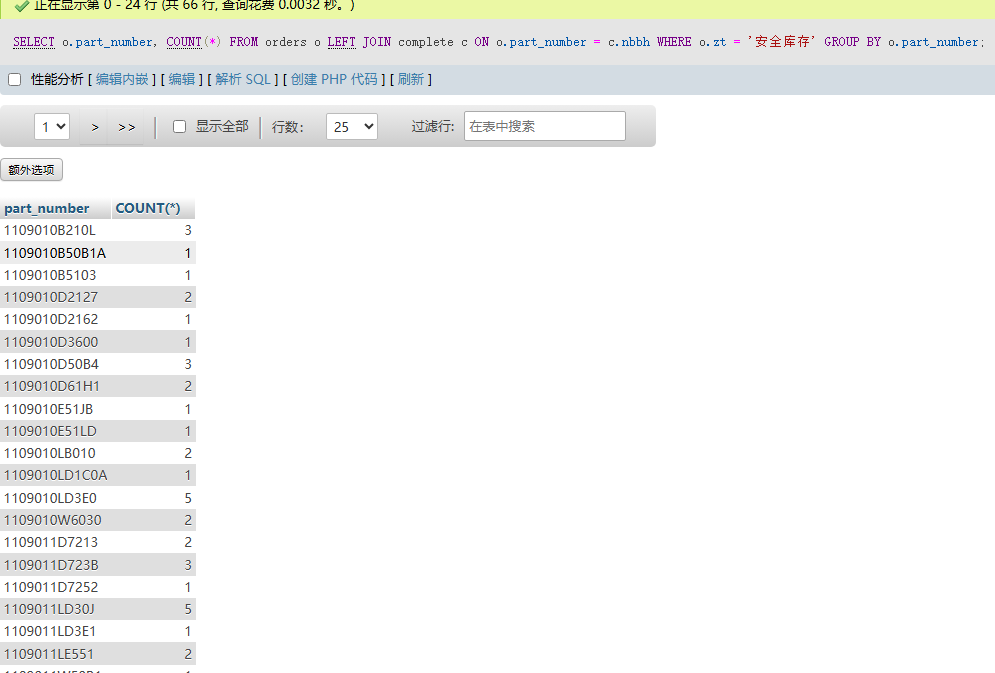
group by重复聚合问题 今天测试时发现有个数据汇总的很有问题,查了下发现出现重复聚合的问题JOIN 关联导致数据膨胀(核心原因)问题本质:LEFT JOIN complete c ON o.part_number = c.nbbh 导致 orders 表数据被重复关联。若 complete 表中存在 多个 nbbh 与同一个 part_number 匹配,则 orders 表的单条记录会被扩展为多条,进而触发 SUM 函数重复累加 quantity 值验证方法:sqlCopy Code-- 检查关联后的总行数是否膨胀SELECT o.part_number, COUNT(*) FROM orders o LEFT JOIN complete c ON o.part_number = c.nbbh WHERE o.zt = '安全库存' GROUP BY o.part_number;若结果中 COUNT(*) 大于 1,则说明存在重复关联36。二、修正方案方案 1:先聚合再关联(推荐)在关联 complete 表前,先对 orders 表按 part_number 完成聚合:sqlCopy CodeSELECTo.part_number, o.urgent_order_quantity -- 直接使用子查询的聚合结果FROM (SELECT part_number, SUM(CASE WHEN zt = '安全库存' THEN quantity ELSE 0 END) AS urgent_order_quantity FROM orders GROUP BY part_number) o LEFT JOIN complete c ON o.part_number = c.nbbh;方案 2:移除冗余关联若 complete 表数据未被实际使用,直接删除关联逻辑:sqlCopy CodeSELECTpart_number, SUM(CASE WHEN zt = '安全库存' THEN quantity ELSE 0 END) AS urgent_order_quantityFROM ordersGROUP BY part_number;三、其他潜在问题排查字段值匹配问题执行以下查询确认 zt 字段实际值是否严格为 安全库存:sqlCopy CodeSELECT DISTINCT zt FROM orders WHERE part_number = '具体零件编号';若存在空格或特殊字符(如 安全库存 ),需修正条件判断12。数据重复问题检查 orders 表中同一 part_number 是否存在多条 zt = '安全库存' 的记录:sqlCopy CodeSELECT part_number, COUNT(*) FROM orders WHERE zt = '安全库存' GROUP BY part_number;四、总结核心问题:LEFT JOIN 导致数据重复,引发 SUM 计算错误36。推荐操作:优先采用 先聚合再关联 的方案,避免关联表引发数据膨胀36。补充验证:同步检查字段值匹配性和数据重复性14。确实存在重复关联问题DeepSeek-R1满血版 回答完成深度思考完成 用时23秒,搜索全网23篇资料针对多表关联导致的数据重复问题,以下是系统性解决方案及实施步骤:一、重复关联根因分析关联条件非唯一性LEFT JOIN 关联的右表(如 complete 表)中存在 多个记录匹配左表同一主键,导致左表单条数据被重复扩展17。验证方法:sqlCopy Code-- 检查 complete 表中 nbbh 的重复性SELECT nbbh, COUNT(*) FROM complete GROUP BY nbbh HAVING COUNT(*) > 1;一对多关系未处理若 orders.part_number 与 complete.nbbh 是 一对多关系,直接关联会导致 orders 数据膨胀67。二、解决方案(按优先级排序)方案 1:先聚合右表再关联(推荐)在关联前对右表按关联字段聚合,确保左表每条记录仅匹配右表一条数据16:sqlCopy CodeSELECTo.part_number, SUM(CASE WHEN o.zt = '安全库存' THEN o.quantity ELSE 0 END) AS safety_stock_quantityFROM orders oLEFT JOIN (SELECT nbbh, SUM(sl) AS total_sl -- 对右表聚合 FROM complete GROUP BY nbbh) c ON o.part_number = c.nbbhGROUP BY o.part_number;方案 2:增加唯一性关联条件若右表存在其他唯一字段(如时间、状态),通过复合条件强制一对一关联17:sqlCopy CodeSELECTo.part_number, SUM(CASE WHEN o.zt = '安全库存' THEN o.quantity ELSE 0 END) AS safety_stock_quantityFROM orders oLEFT JOIN complete c ON o.part_number = c.nbbhAND c.date = '2025-04-15' -- 补充唯一条件(需按业务调整)GROUP BY o.part_number;方案 3:使用 DISTINCT 去重对关联结果强制去重(适用于小数据量场景,性能敏感场景慎用)34:sqlCopy CodeSELECT DISTINCTo.part_number, SUM(CASE WHEN o.zt = '安全库存' THEN o.quantity ELSE 0 END) OVER (PARTITION BY o.part_number) AS safety_stock_quantityFROM orders oLEFT JOIN complete c ON o.part_number = c.nbbh;三、附加验证与优化数据类型一致性验证检查 orders.part_number 与 complete.nbbh 的数据类型是否严格一致(如 VARCHAR vs BIGINT),避免隐式转换导致关联失效2。空值处理优化在聚合函数中显式处理空值,避免统计失真56:sqlCopy CodeSUM(CASE WHEN o.zt = '安全库存' THEN COALESCE(o.quantity, 0) ELSE 0 END)四、典型场景对比场景 推荐方案 优势 局限性右表数据量大 方案1(先聚合) 减少关联数据量,提升性能 需修改SQL结构右表有唯一辅助字段 方案2(复合条件) 保留明细数据 依赖额外唯一字段快速临时修复 方案3(DISTINCT) 改动最小 性能差,不适用大数据量一、重复统计根因分析 complete 表多值关联引发数据膨胀 LEFT JOIN complete c ON o.part_number = c.nbbh 导致 orders 表每条记录可能关联到 complete 表多条数据,进而使 SUM 函数对 quantity 重复累加16。 关联表未预聚合 complete 表的 sl 字段未按 nbbh 预先聚合,直接关联导致统计值翻倍68。 二、优化方案(分两步修正) 1. 修正 complete 表关联逻辑 对右表 complete 先按 nbbh 聚合,消除重复关联影响: sql Copy Code SELECT o.part_number, SUM(CASE WHEN o.zt = '安全库存' THEN o.quantity ELSE 0 END) AS urgent_order_quantity, SUM(CASE WHEN o.zt = '周计划' THEN o.quantity ELSE 0 END) AS weekly_plan_quantity, SUM(CASE WHEN o.zt = '外围' THEN o.quantity ELSE 0 END) AS external_plan_quantity, COALESCE(c.total_sl, 0) AS completed_quantity -- 直接引用预聚合结果 FROM orders o LEFT JOIN ( SELECT nbbh, SUM(sl) AS total_sl -- 预先聚合右表 FROM complete GROUP BY nbbh ) c ON o.part_number = c.nbbh GROUP BY o.part_number; 2. 验证字段值匹配性 检查 orders.zt 字段的实际值是否包含 安全库存、周计划、外围 等精确匹配值: sql Copy Code SELECT DISTINCT zt FROM orders; 若存在空格或大小写问题,需调整 CASE WHEN 条件中的匹配规则14。 三、关键优化点说明 优化项 原查询问题 修正后效果 complete 表关联方式 直接关联导致 SUM 重复计算68 预聚合后消除重复关联风险68 字段值匹配 模糊匹配导致统计遗漏14 精确匹配目标状态值14 空值处理 未显式处理 NULL 值48 COALESCE 确保数值稳定性48 四、附加验证建议 关联字段一致性验证 检查 orders.part_number 和 complete.nbbh 的编码规则是否一致(如数据类型、分隔符等),避免关联失效57: sql Copy Code SELECT part_number FROM orders LIMIT 10; SELECT nbbh FROM complete LIMIT 10; 数据重复性排查 确认 orders 表中同一 part_number 是否存在多条相同 zt 的记录: sql Copy Code SELECT part_number, zt, COUNT(*) FROM orders GROUP BY part_number, zt HAVING COUNT(*) > 1;




0:00